Reolink
- 3.5
- Rating
- 5.00M
- Installs
- Free
- Price

 Analysis by App-foxy
When I first use a security-camera app, I usually want one thing: to see what is happening without turning a simple check into a technical project. Reolink App is built for that purpose, connecting Reolink cameras, NVRs, and DVRs to a phone or tablet for remote viewing. After spending time with it, I found that its strongest quality is not novelty. It is the way it can become a quiet part of a daily security routine.
This is a free communication app from Reolink Innovation Limited, aimed at people who already use Reolink equipment or are considering a camera system from the same brand. It is available for Everyone, supports devices running Android 8.0 or later, and has been around since May 18, 2015. The current version is 4.59.0.5.20260127, so it is clearly an established product rather than a new experiment.
My overall impression is positive but practical. The app is most useful when it helps me answer a quick question: Did someone arrive, is a delivery still outside, or what caused a sound near the entrance? It is less appealing if I want one universal viewer for cameras from several manufacturers. Reolink App works best as the control center for a Reolink setup, not as a general-purpose replacement for every camera platform.
You May Also Like

 Blood Strike: 2.5 Anniversary
Blood Strike’s Loadouts Turn Every Drop Into a Tactical Gamble
A close look at Blood Strike’s custom loadouts: how fast access to signature weapons reshapes its battle royale rhythm, rewards preparation, and narrows the gap between fights.

 Pandora - Music & Podcasts
Pandora’s Music Is Easy to Start, but Harder to Recover
Pandora’s strength is its low-effort path from a seed to a station. Its weak spot is how much confidence it asks you to place in connection, setup, and quiet recovery.

 8 Ball Pool
 Is Built on Rivalries, Rematches, and Routine
A close look at the rivalries, rematches, shared routines, and unanswered safety questions that turn a quick pool match into a persistent mobile community.

 Samsung Music
’s Quiet Strength Is Playing What You Already Own
Its reach comes less from spectacle than from dependable access to a personal library. That simplicity is both the app’s strongest retention engine and its ceiling.

 AccuWeather: Weather Radar
AccuWeather Review: A Quick, Clear Forecast for Everyday Decisions
For everyday plans, the best forecast is the one you can understand quickly. AccuWeather makes rain timing, radar, and local conditions easy to act on, with a few trade-offs.

 Hill Climb Racing
Why Hill Climb Racing Still Turns Crashes Into One More Run
A tiny car, a bumpy hill and one more upgrade: Hill Climb Racing keeps resurfacing because its simple chaos makes every near-miss feel personal.
More From Our News Desk



How it feels during the first week
The first week is when the app makes its best impression. Once the compatible camera or recorder is available, opening the app and reaching a live view feels more direct than walking to a computer or opening a browser. That convenience matters most in ordinary moments: checking the driveway while preparing dinner, looking at a back door after hearing a noise, or confirming that a family member has arrived home.
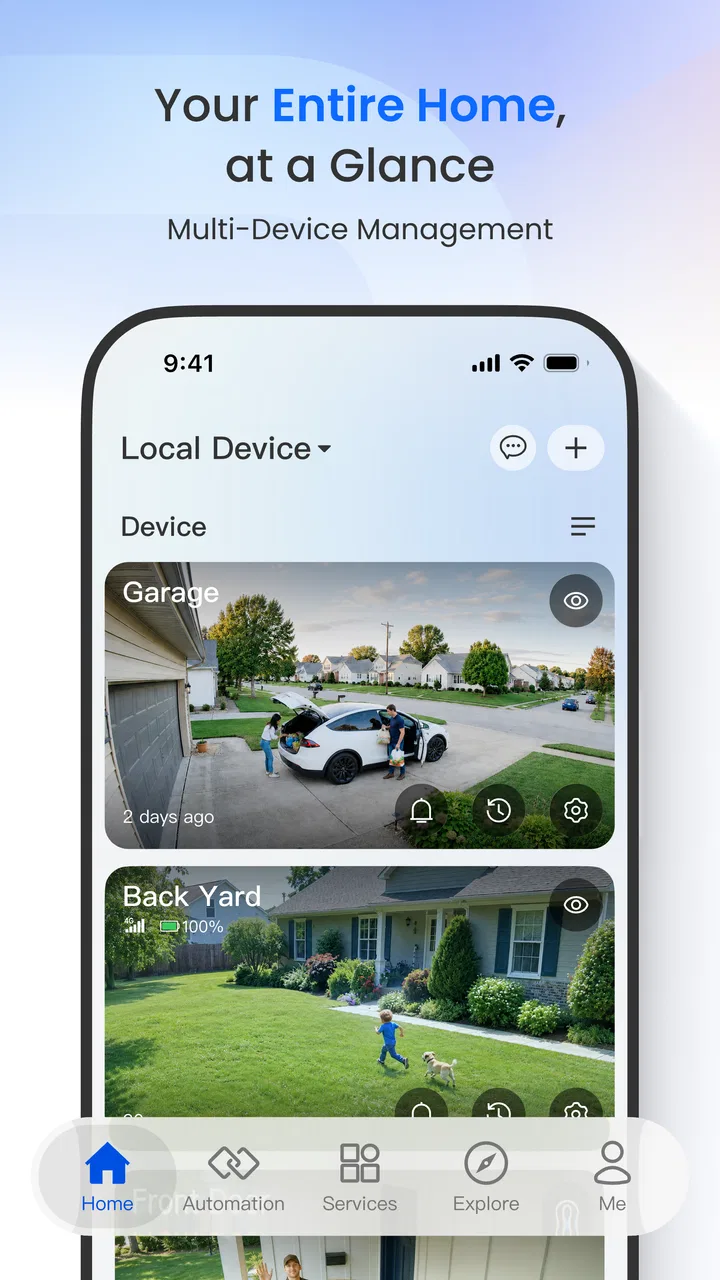
The interface is centered on viewing rather than social features, messaging, or distracting content. That focus suits the job. I do not open it to browse; I open it because I need visual information. The store describes it as a remote-viewing tool for security cameras, NVRs, and DVRs, and that is exactly the role it fills in my routine.
One useful habit is to decide in advance which views deserve regular attention. If a system has several cameras, it is tempting to open every feed whenever something happens. That quickly becomes tiring. I get more value by treating the app as a quick verification tool: start with the camera closest to the event, then move to another view only if the first one leaves a question unanswered.
The app is also more useful when paired with a clear household routine. For example, I might check the front entrance before leaving work, glance at the side gate when a pet is outside, and use a recorded view only when the live image does not explain what happened. This sounds simple, but it prevents the app from becoming a source of constant checking.
Remote viewing is not the same as having a person watching continuously. A camera feed can show what is visible at the moment I open it, while a recorder can help investigate an earlier event. That distinction shaped my expectations. I found the app valuable for quick decisions, but I would not treat it as a substitute for physical locks, lighting, sensible access control, or an emergency service.
The first-week appeal also depends heavily on the equipment behind the app. Someone with a single Reolink camera may find the experience straightforward. Someone managing a larger camera and recorder arrangement has more to organize, including camera names, viewing order, and a consistent method for reviewing events. The app can support that setup, but it does not remove the need to think about how the system should be used.
Small workflows that make the app more useful
One of my favorite practical workflows is to use live view for confirmation and recordings for context. If I notice movement near a gate, I first check the current image. If nothing is visible, I look back at the relevant period instead of repeatedly refreshing the live feed. This saves time and reduces the habit of staring at a camera that may not show the original event anymore.
Another useful approach is to give cameras names based on location rather than hardware identity. “Side gate” is easier to recognize under pressure than a model name or an arbitrary device label. This is a small organizational choice, but it becomes important when several feeds look similar or when another family member needs to check the system.
I also recommend testing the exact viewing routine before relying on it while away from home. Open the app from the places where you normally use it, check whether the correct camera is easy to reach, and make sure everyone who needs access understands the same layout. A camera system can be technically installed yet practically confusing, and the app cannot compensate for unclear household procedures.
Why it can still matter month after month
The lasting value of Reolink App comes from repetition. A security app earns its place when it removes small uncertainties often enough to justify keeping it installed. In my experience, that means the app needs to be quicker than finding another device, clearer than guessing what happened, and dependable enough that I remember it when a real question appears.
A realistic everyday example is a delivery left near the entrance while I am away. I can check the live view to see whether the package is still there, then use the recorded footage if I need to understand when it arrived. Later, I might ask someone at home to retrieve it. The app does not make the situation dramatic; it simply shortens the chain of decisions.
The same pattern works for a small business, workshop, or shared property. A manager may want to inspect an entrance before opening, check whether a service area is clear, or verify an unusual event without traveling to the site. The app is particularly sensible when the cameras and recorder already belong to Reolink, because keeping viewing and recording within one manufacturer’s ecosystem is usually simpler than combining unrelated systems.
Its audience is not limited to technically confident users, but the long-term benefit depends on accepting a little setup discipline. The app is not a magic layer that turns any camera into a perfectly organized security system. I get more from it when I decide what matters, arrange views logically, and avoid saving every possible clip without a reason.
The public response suggests a mixed but substantial user base: Reolink App has an average rating of 3.3 from around 37 thousand ratings, with roughly 6.2 thousand written reviews and more than 5 million installs. I read that combination as a useful warning rather than a simple verdict. Many people clearly use it, but the middling average suggests that smooth experiences are not universal. Camera apps are unusually sensitive to network conditions, device combinations, and expectations, so a rating should encourage realistic testing rather than blind confidence.
Compared with a camera maker’s cloud-first alternative, this app may feel more focused on people who own Reolink hardware and want direct access to that system. Compared with a generic smart-home dashboard, it is less about bringing every brand into one screen and more about giving Reolink devices a dedicated viewing environment. That trade-off is important. A mixed-brand household may prefer broader compatibility, while a Reolink-only setup may benefit from staying within one ecosystem.
Compared with checking cameras through a desktop interface, the phone app wins on immediacy. I can use it while moving around the house or away from my desk. The compromise is that a phone screen is not ideal for extended investigation, especially when several views or a longer time period need careful comparison. For serious review work, I still prefer a larger display when one is available.
The maintenance that determines its real value
The recurring maintenance is less about opening the app every day and more about keeping the surrounding system understandable. Camera names, viewing order, recorder access, and household habits should be reviewed when the property changes. A moved camera or unused view can make the app feel cluttered, even if the software itself has not changed.
I would also make a periodic check part of the routine rather than waiting for a security concern. Open the important views, confirm that they show the areas you actually care about, and review whether the recorder arrangement still matches your needs. This is not glamorous maintenance, but it is what separates a camera system that exists from one that is genuinely useful.
Software updates deserve attention too. The current release is 4.59.0.5.20260127, and keeping the app current is sensible for compatibility and general reliability. At the same time, an update can change small interface details or alter the way a familiar task feels. After updating, I would quickly revisit the main viewing screen and any routine I depend on rather than assuming everything is exactly where it was.
Household access is another overlooked issue. If several people use the system, decide who should be able to view it and who should handle changes. Sharing access casually can create confusion later, particularly when someone needs to identify a camera or review an event. The app is easier to live with when responsibility is clear.
Storage and attention also need management. A system that records constantly can produce more footage than anyone wants to review. I find it more practical to define the situations that deserve investigation and avoid treating every movement as equally important. The app can be a helpful window into a security system, but it cannot decide which moments matter to a particular household without human judgment.
Where fatigue starts to appear
The first source of fatigue is checking too often. Remote access feels powerful at the beginning, and I can understand the temptation to open the app whenever I wonder what is happening. Over time, that habit turns useful information into background anxiety. I get better long-term value when I use the app for specific questions instead of seeking constant reassurance.
Another source is the gap between a quick live check and a proper investigation. A live image may answer “Is anything there now?” but not “What happened earlier?” Moving between current viewing and recordings requires a more deliberate workflow. That is not a flaw unique to this app, but it is a reason not to judge the entire experience by the first few effortless checks.
People with mixed camera brands may also become frustrated. Reolink App is a natural choice for Reolink cameras, NVRs, and DVRs, but it is not the obvious answer for someone who wants one neutral app across several manufacturers. In that situation, a broader smart-home or surveillance platform may be worth considering, even if it sacrifices some brand-specific simplicity.
Users who want a highly polished, minimal-maintenance cloud experience should think carefully before choosing a hardware-centered camera ecosystem. The dedicated app can be more meaningful when I already understand the equipment and want direct control, but someone who wants the least possible involvement may prefer a service designed around automatic setup and subscription-based convenience.
There is also a privacy and responsibility trade-off in any remote camera arrangement. Being able to view a home from elsewhere is useful, but it means I should be thoughtful about who can access the system and where cameras point. I would not install a camera in a place where household members or visitors reasonably expect privacy, and I would explain the setup to people who regularly enter the property.
The age rating of Everyone makes the app broadly accessible, but that should not be confused with universal suitability. A child may be able to open a camera viewer, yet a household still needs adult decisions about access, privacy, and how recordings are handled. The software may be simple to launch; the responsibility around it is not.
Who should choose it, and who should skip it?
I would recommend Reolink App to someone who owns Reolink equipment and wants a practical way to view cameras away from the recorder. It is also a reasonable choice for a small property, a workshop, or a family home where quick visual checks are more important than building a complex multi-brand automation system.
I would be more cautious if the main requirement is one interface for cameras from many manufacturers. I would also hesitate if the user dislikes maintaining device names, reviewing camera placement, or learning the difference between live viewing and recorded investigation. In those cases, a more unified alternative may be less frustrating, even if it is not as closely matched to Reolink hardware.
The free price lowers the barrier to trying it, but the app is not the whole cost or commitment of a security setup. The cameras, recorder, network, installation, and time spent maintaining sensible routines matter more to the long-term experience. I would decide based on the complete system rather than choosing an app in isolation.
Before committing to regular use, I would answer four practical questions. Do I already have compatible Reolink equipment? Which cameras genuinely need remote access? Who in the household should use the app? And what will I do when a view raises a concern? Clear answers make the app feel purposeful; vague answers usually lead to unused feeds and unnecessary checking.
My long-term verdict
After the novelty fades, Reolink App earns its space when it becomes a short, repeatable habit: open it, inspect the relevant view, review a recording only when needed, and close it. That is not an exciting feature list, but it is the right measure for a security tool. Its value is in reducing uncertainty without demanding attention all day.
I like that the app stays tied to a clear job and supports the everyday situations in which remote viewing is genuinely useful. I also appreciate that its best use does not require turning security into entertainment. A quick look at an entrance, gate, or workspace can be enough.
My reservations are equally practical. The experience depends on the wider Reolink setup, and the middling public rating tells me that not everyone will find the combination of software, hardware, and network equally smooth. People seeking a universal camera dashboard or a completely hands-off service may be happier elsewhere.
For the right owner, though, the free app is worth trying because it can make existing Reolink cameras far more convenient to use. I would keep it installed if I relied on those devices, provided I maintained a clear camera layout and resisted compulsive checking. Its lasting strength is routine, not novelty: it turns a Reolink security system into something I can consult quickly and then get on with my day.
In short, I see Reolink App as a focused communication tool for remote camera access rather than a universal smart-home command center. It is a good fit for Reolink users who value direct viewing and are willing to manage their system thoughtfully. If that describes you, it deserves a place on your phone; if not, choosing a broader alternative may save you maintenance and frustration in the long run.
FAQs for Reolink
01What features does the Reolink app offer?
The Reolink app provides a comprehensive suite of features for monitoring and managing your security cameras. Users can access live streaming, playback recorded footage, receive motion alerts, and control multiple cameras from a single interface. It also supports two-way audio, allowing communication through the camera. The app is compatible with both Android and iOS devices.
02Is the Reolink app free to use?
Yes, the Reolink app is free to download and use. However, some advanced features may require compatible Reolink cameras or additional subscriptions for cloud storage. Basic functionalities like live view and motion alerts are available without any cost, making it accessible for most users who own Reolink devices.
03How user-friendly is the Reolink app for beginners?
The Reolink app is designed with an intuitive interface, making it user-friendly for beginners. The setup process is straightforward, with step-by-step guides to connect your cameras. The app’s dashboard is easy to navigate, offering clear options for viewing live feeds, accessing recordings, and managing settings, ensuring a smooth experience for new users.
04What are the system requirements for the Reolink app?
The Reolink app requires a device running on Android 5.0 or later, or iOS 9.0 or later. It is optimized for both smartphones and tablets. A stable internet connection is necessary for accessing live streams and cloud services. These requirements ensure compatibility with most modern mobile devices, allowing a broad user base to access the app.
05How secure is the Reolink app?
Reolink prioritizes user security by implementing several protective measures. The app uses encryption protocols to safeguard video feeds and user data. Additionally, it supports two-factor authentication for enhanced account protection. Regular updates are provided to address any vulnerabilities, ensuring users' privacy and the security of their surveillance systems.
Pros
- User-friendly interface with intuitive controls.
- High-quality video streaming and recording.
- Wide range of compatible devices.
- Customizable motion detection alerts.
- No subscription fees for basic features.
Cons
- Initial setup can be time-consuming.
- Occasional connectivity issues reported.
- Limited third-party smart home integration.
- Advanced features require paid plan.
- Some users report app crashes on updates.

Reolink
Gallery